
Single Chart Analysis

Upload your trading chart and get instant AI-powered analysis

How to Upload a Chart for Best Analysis
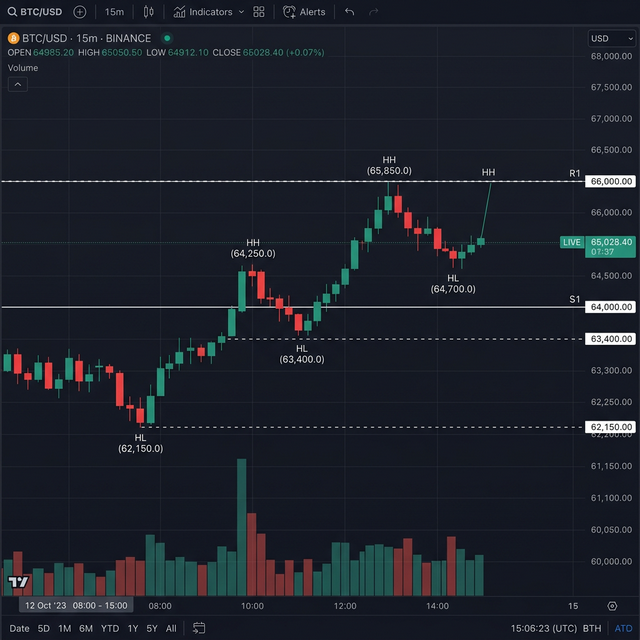
Example TradingView chart ? clean dark theme candlestick chart

Upload a Clear Trading Chart

Follow these steps to get the most accurate AI analysis.

Upload a clean TradingView chart screenshot
Make sure the timeframe label is clearly visible on the chart
Avoid cluttered indicators ? price action only works best
Chart should show recent price structure (last 50?100 candles)
Higher clarity images produce better AI analysis results
Tip: Crop unnecessary screen elements before uploading for sharper analysis.

Upload Chart

Click or drag & drop your chart image here

Supported formats: JPG, PNG (Max 5MB)

Chart preview

Optional Buyers Analysis

From Multi-Chart Analysis — optional

Paste the market direction summary generated by Multi-Chart Analysis. This gives the AI higher timeframe context and significantly improves trade accuracy.

Example: Monthly ? Bullish BOS confirmed. Weekly ? Discount demand zone holding. Daily ? Buyers accumulating above OB zone.

Select Timeframe

Market Simulation

Analysis Results

Professional AI-powered trading analysis

Signal
--
Recommended direction
Trade Range
--
Entry zone
Take Profit 1
--
1:1 Risk Reward
Take Profit 2
--
1:2 Risk Reward
Take Profit 3
--
1:3 Risk Reward
Stop Loss
--
Risk management

Analysis Logic

AI reasoning and market structure breakdown

Analysis reasoning will appear here...

No Analysis Yet

Upload a chart to get started with AI-powered analysis